Maria S.
Home Health Aide- Background screening — Current
- Required training — Current
- Credential — Current
No action needed.
 Sign in
AideClear checks employee requirements every day, watches for missing or expiring items, and checks the state board, registry, or other source behind each requirement. Stay ahead of renewal gaps that can put your agency’s license at risk. It contacts employees, follows up, and documents the trail so you handle only what needs judgment.
14-day free trial, no credit card. Cancel anytime from your billing settings. Your data stays yours — workforce records only, never patient records.
Not ready for a trial? Use our free home-care compliance readiness checklist to review workforce files, expirations, follow-up and audit evidence. No account needed.
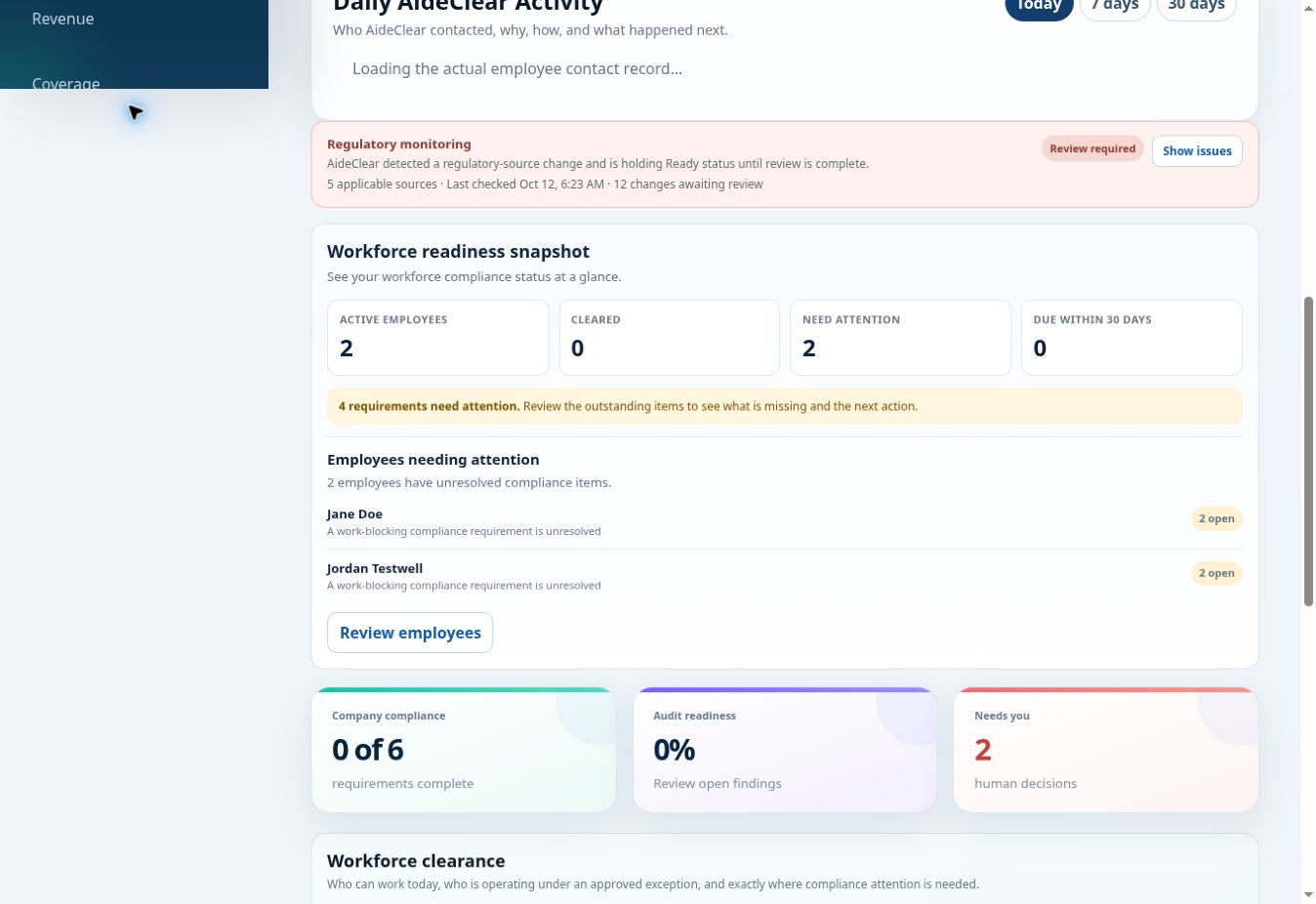
See why a worker is cleared, at risk, or needs your attention. AideClear keeps the requirement, evidence, verification source, employee follow-up, and compliance history connected so your team can see how a status was reached.
Applicable requirements can be tied to the state, agency, board, registry, program, or other authoritative source behind them. When AideClear cannot safely verify an item, it keeps the item unresolved for review. The compliance framework is not a guarantee that every rule applies to every agency.
Explore requirements and sourcesBilling handled by Stripe. Review payment and renewal terms in checkout before confirming a paid subscription.
Who this is for: home-care agencies managing workforce and agency compliance. If you need a replacement for EVV, scheduling, payroll, billing, or patient clinical records, keep a system built for that job. AideClear does not provide legal advice or regulator approval.
AideClear supports compliance operations and audit readiness. It does not replace legal advice or regulator judgment.
Illustrative examples based on AideClear's statuses and workflows. These are example records, not customer data or screenshots.
No action needed.
AideClear contacted James and started the renewal follow-up.
AideClear checked the available evidence but could not confirm the result.
The item stays unresolved.
Your team handles the exception. AideClear handles the routine chasing. Timing depends on the requirement, configured workflow, contact permissions, and supported providers.
14-day free trial, no credit card. Cancel anytime from your billing settings. Your data stays yours — workforce records only, never patient records.
No credit card required to start. You can review plans before creating an account.
You do not have to guess how AideClear works. Review the product examples below, see the current plans, or start the 14-day trial when you are ready.
Most compliance software tells you there is a problem and waits for someone on your staff to solve it. AideClear is built to take the repetitive work off the administrator: check what applies, identify the issue, contact the employee, follow up, document the action, and surface only the exceptions that need a person.
AideClear continuously reviews each employee against the requirements attached to their role, location, program, and agency profile so problems are found before they become staffing surprises. Read the daily monitoring guide.
The state board, registry, or other source behind a requirement stays connected to it. AideClear monitors those sources for changes and keeps the source path visible so your team can inspect the basis for a requirement themselves.
When a document is missing, expiring, incomplete, or needs action, AideClear can contact the employee directly instead of making the administrator chase them manually.
AideClear keeps the workflow moving after the first message, records responses, follows up on unresolved items, and escalates when an administrator actually needs to step in.
Cleared, At Risk, and Needs You statuses show what is safe, what is approaching a problem, and what truly requires human judgment—with the reason attached.
See which employees AideClear contacted, why they were contacted, what was sent, the current status, and what remains unresolved—without reconstructing the day from email and texts.
Your administrator should not have to spend the day checking spreadsheets, opening employee folders, remembering renewal dates, sending the same reminders, and wondering whether anyone followed up. AideClear is designed to run that repetitive compliance loop automatically and leave a documented trail behind it.
A credential may still be verified by the authority that issued it—a state board, registry, approved training provider, screening vendor, lab, or other source. AideClear coordinates the compliance lifecycle around that evidence: why the requirement applies, where it is verified, when it expires, what the employee needs to do, what outreach occurred, and whether the issue is resolved.
AideClear is designed around the real operating cycle of home-care compliance: determine what applies, collect and verify evidence, stay ahead of expiration, contact the employee, follow up, and preserve a record for the administrator and the audit trail.
Keep your scheduler or EVV. CSV import provides a practical onboarding path while additional direct integrations are evaluated. Communication and verification services depend on configuration, permissions, and provider availability.
These direct connectors are not live integrations.
Start with CSV roster import or contact support about your needs. Planned integrations are not a delivery commitment.
No customer testimonials or independent customer ratings are published here yet. Use the 14-day card-free trial to evaluate the workflow with your agency’s requirements, and contact support@aideclear.com with questions before choosing a paid plan.
It depends on your roster size, locations, payer programs, and how clean your current records are. AideClear does not publish a fixed “15-minute setup” promise because safe requirement mapping matters more than a marketing stopwatch. You can start with a CSV roster import and configure the agency profile from there.
CSV roster import is available today. Direct connectors for AxisCare, WellSky, HHAeXchange, and AlayaCare are being researched, and Homecare Homebase / Alora is planned. AideClear will not label a connector “available” until it is production-ready and supported.
You can use your current roster as the starting point instead of retyping every employee. AideClear then becomes the working compliance layer for requirements, evidence, expirations, outreach, exceptions, and the activity trail.
No. AideClear is designed as a focused compliance system, not a replacement for scheduling, EVV, payroll, billing, or your clinical record system.
Yes. Paid subscriptions renew until canceled, and you can cancel subject to the billing terms shown at checkout. There is no credit card required to start the 14-day trial.
AideClear is intended for workforce and agency compliance records, not patient clinical records. See the Security & Data Handling page for the current safeguards and limitations.
Plans scale primarily with the number of active workers AideClear keeps under compliance management. Higher-complexity organizations can add implementation, integrations, state/payer configuration, and enterprise controls as needed. Start with a 14-day free trial. No credit card required.
For smaller single-location agencies.
14-day free trial, no credit card. Cancel anytime from your billing settings. Your data stays yours — workforce records only, never patient records.
About $2.65 per active worker per month at the full 75-worker capacity. The plan is billed at $199/month.
For growing agencies with recurring compliance workload.
14-day free trial, no credit card. Cancel anytime from your billing settings. Your data stays yours — workforce records only, never patient records.
For larger or more complex agencies.
14-day free trial, no credit card. Cancel anytime from your billing settings. Your data stays yours — workforce records only, never patient records.
Compare Growth with the time your office spends chasing documents each month: at an illustrative $25/hour, $199 is about 8 hours of administrative time. This is a cost comparison, not measured savings.
Worker limits, locations, and the workflows listed for each plan. Enterprise is scoped separately.
| Plan detail | Starter · $99/month | Growth · $199/month | Scale · $399/month | Enterprise · Custom |
|---|---|---|---|---|
| Active workers | Up to 25 | Up to 75 | Up to 175 | Custom · 176+ |
| Locations | Single location | Up to 3 | Multi-location | Custom · multi-state / multi-entity |
| Follow-up and escalation | ✓ Employee reminders and follow-up | ✓ Multi-step escalation workflows | ✓ Advanced clearance and exception history | Custom workflows and controls |
| Evidence and exports | ✓ Worker-level audit evidence | ✓ Agency-wide audit roster and basic clearance export | ✓ Scheduler-ready eligibility controls | Custom export / API scope |
| Requirement packs | Confirm your agency’s scope with support | ✓ Role-based requirements and 30/60/90-day risk visibility | ✓ State/payer requirement-pack support | Custom state / payer configuration |
| Configuration support | Contact support to confirm setup scope | Contact support to confirm setup scope | ✓ Priority configuration support | Guided implementation, scoped separately |
A checkmark identifies the capability named in that plan’s published description; it does not mean other plans exclude it. Confirm requirement-pack coverage, export formats, and implementation scope with support before committing.
For 176+ active workers, multi-state or multi-entity organizations, franchises, SSO/API needs, deeper integrations, custom controls, security review support, and guided implementation. Enterprise is scoped around the operating complexity AideClear must safely support.
14-day trial, no credit card required. Paid subscriptions can be canceled subject to the billing terms shown at checkout.
A worker counts toward the limit when their caregiver record is marked active in your agency. Inactive records do not count. The limit counts active records, not visits, shifts, uploaded documents, or monthly logins.
AideClear prevents adding or reactivating workers beyond the plan limit. Upgrade before adding more active workers. For more than 175 workers or complex organizations, contact support about Enterprise.
No. Create and confirm your account to start the 14-day trial without a credit card. Choose Starter, Growth, or Scale when signing up.
Paid subscriptions renew until canceled. Use Manage billing in Settings to open the Stripe billing portal. The billing area shows cancellation status and the access-through date when cancellation is scheduled for period end. The terms shown at checkout apply.
The self-service plans are listed at their monthly subscription prices. Custom implementation, integrations, and Enterprise support are scoped separately; contact support to confirm any additional work before committing.
A card-free trial does not itself create a paid Stripe subscription. To continue on a paid plan, select a subscription in Settings and complete Stripe checkout. The checkout shows the payment and renewal terms before you confirm.
Starter supports smaller single-location agencies up to 25 active workers. Growth supports growing agencies up to 75 workers and 3 locations. Scale supports up to 175 workers with multi-location needs. Enterprise is scoped for 176+ workers, multi-state or multi-entity operations, and custom SSO, API, integration, or control requirements.
AideClear is built by Ty Fisher of Fisher Software around that operating principle: keep routine checks and follow-up moving, and make the situations requiring human judgment visible.
About AideClearKnow who is cleared, what is at risk, which employee AideClear contacted, what it asked them to do, whether they responded, what source supports the requirement, and what still needs your attention.
A lapsed renewal should never be the thing that puts your license at risk. Be ready to show the surveyor who is cleared, what needs attention, and the evidence behind it.
Start free trial14-day free trial, no credit card. Cancel anytime from your billing settings. Your data stays yours — workforce records only, never patient records.